Sign up to unlock more features
- Save this deck to your account
- Study flashcards with spaced repetition
- Export to Anki (.apkg) or PDF
- Process documents up to 100 pages
- Images extracted from PDFs and documents
- Better text extraction from your PDFs and documents
- Better flashcards with our more advanced AI model
What is firmware?
Where is firmware stored?
Is firmware application specific?
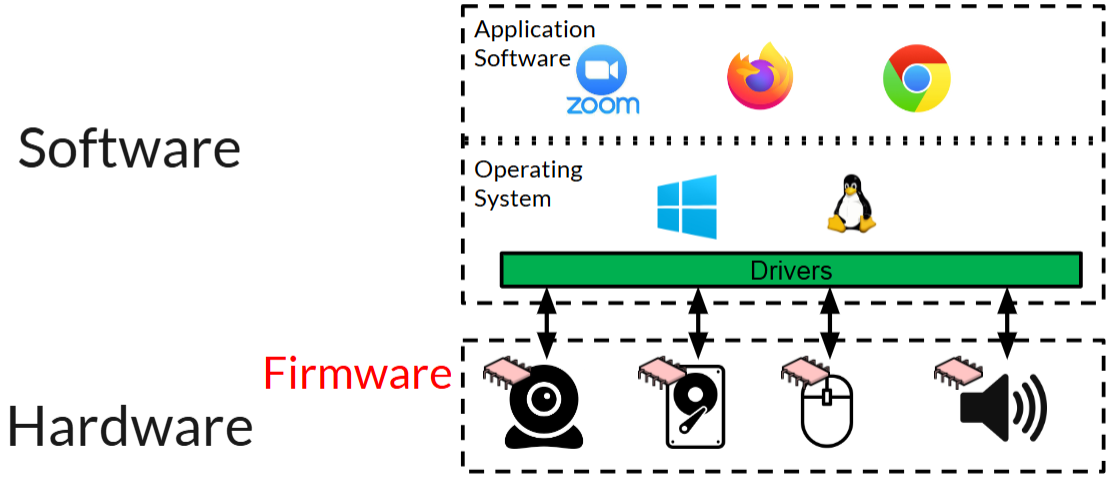
How does firmware relate to software and hardware?
What diagram illustrates the relationship between software, firmware, and hardware?
List the components involved in the firmware relationship diagram.
What aspects could firmware classification indicate?
What is a Type I Embedded System?
Describe the characteristics of Type I Embedded Systems.
What defines a Type II Embedded System?
What are the characteristics of Type II Embedded Systems?
What is a Type III Embedded System?
Identify a characteristic of Type III Embedded Systems.
What are the advantages of classifying firmware?
How is firmware important in embedded systems?
What are the disadvantages of classifying firmware?
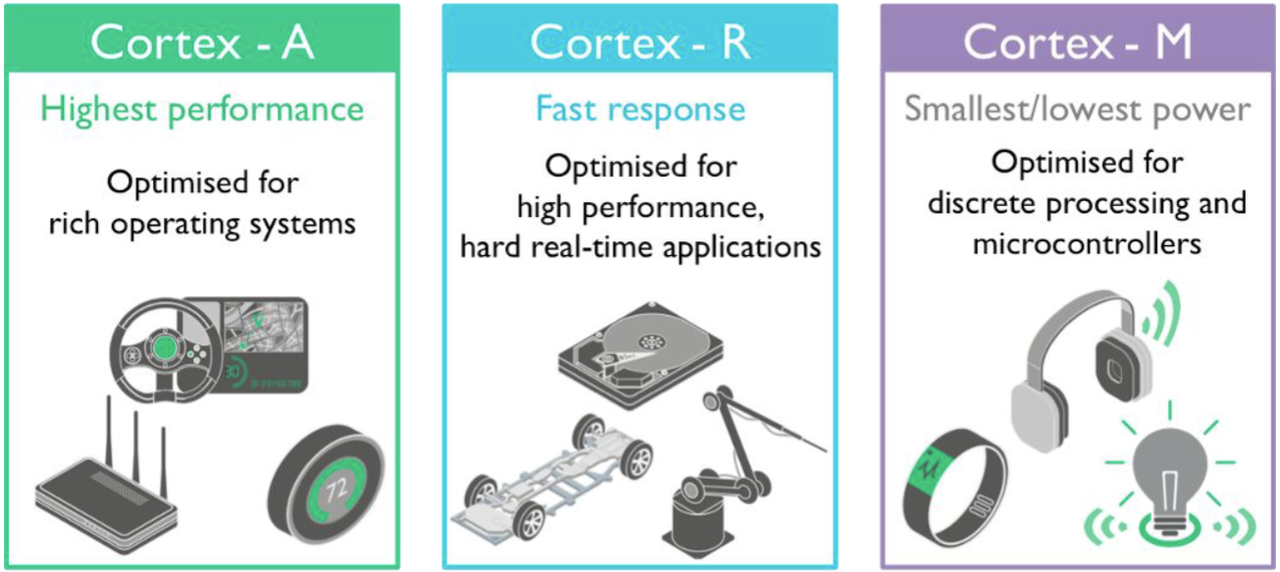
Which ARM profile is optimized for rich operating systems and offers highest performance?
Identify the ARM profile designed for hard real-time applications.
Which ARM profile is best for low power and microcontrollers?
List typical uses of the Cortex-A ARM profile.
Describe the optimization focus of the Cortex-R ARM profile.
List typical uses of the Cortex-R ARM profile.
What are common applications of the Cortex-M profile?
What is firmware's role in embedded systems?
What does the instruction add r0, r1, r2 do?
What does the instruction ldr r0, [sp] accomplish?
What is the purpose of the instruction str r0, [sp, 4]?
Explain the function of bl 0x0800144.
What type of memory structure is typical in deeply embedded firmware?
Do memory maps usually use virtual address spaces?
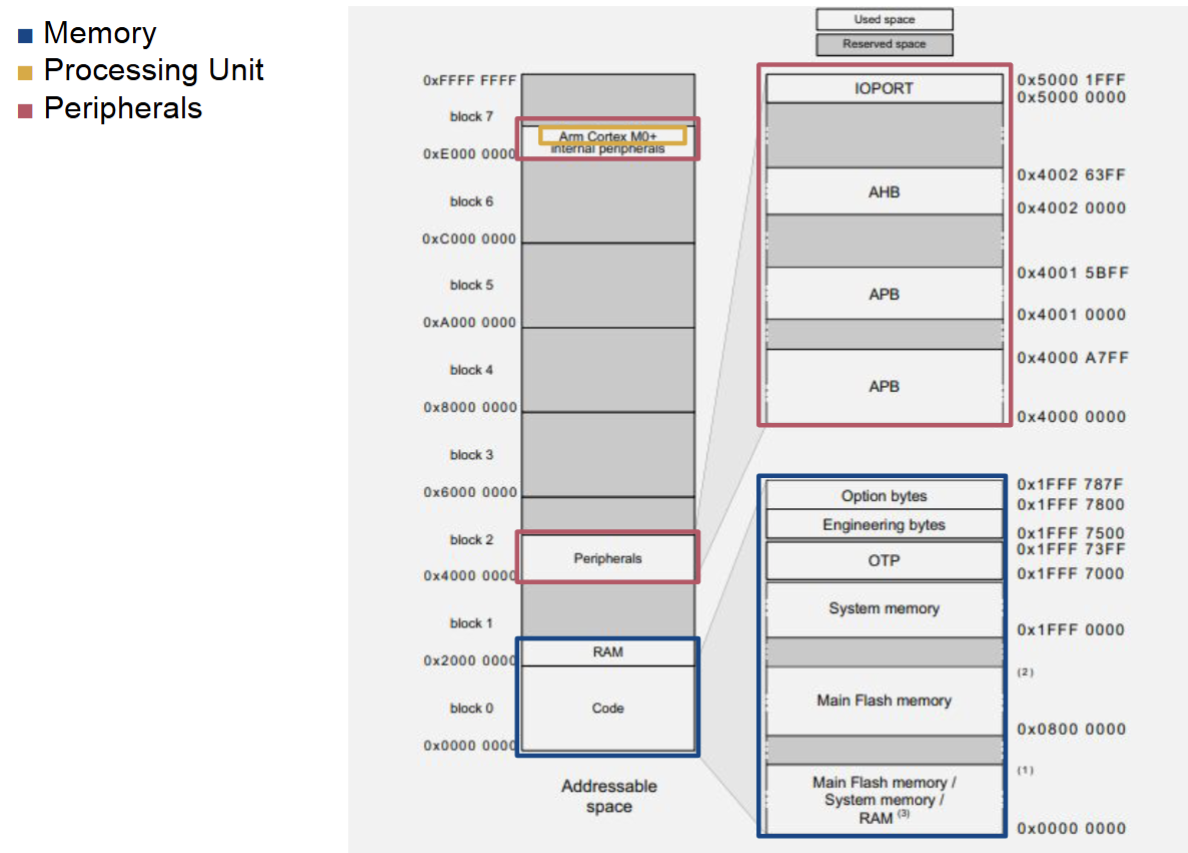
What does the memory map include?
Summarize the importance of firmware in embedded systems.
Flashcards in this deck (32)
-
What is firmware?
Firmware is low-level code that drives the system, stored in non-volatile memory, and performs direct hardware interactions.
firmware definition -
firmware storage
-
firmware functionality
-
How does firmware relate to software and hardware?
Firmware is positioned between application software/operating system and hardware, enabling direct hardware interactions.
firmware relationship -
diagram firmware
-
List the components involved in the firmware relationship diagram.
- Application Software
- Operating System
- Drivers
- Firmware
- Hardware
firmware components -
What aspects could firmware classification indicate?
It suggests complexity and security measures of the firmware types.
firmware classification -
What is a Type I Embedded System?
General purpose OS-based; uses a popular OS like Linux retrofitted for embedded systems. Example: Linux on a router.
embedded_systems type_i -
Describe the characteristics of Type I Embedded Systems.
- Hardware interaction abstracted by the kernel
- Custom components may be used
- No loadable kernel modules
embedded_systems characteristics -
What defines a Type II Embedded System?
Embedded OS-based; uses a custom OS designed for embedded systems. Example: VxWorks on NASA's Curiosity Rover.
embedded_systems type_ii -
What are the characteristics of Type II Embedded Systems?
- Designed to solve custom challenges e.g. real time constraints
- Often no MMU/virtual memory
- Reduced functionality compared to traditional OSs
embedded_systems characteristics -
What is a Type III Embedded System?
No OS-abstraction; can be entirely custom. Example: Firmware on a Logitech G600 Mouse (Atmel ATmega32 HW).
embedded_systems type_iii -
Identify a characteristic of Type III Embedded Systems.
May include an 'OS-library' but system and application code are compiled together; no strict kernel/user separation.
embedded_systems characteristics -
What are the advantages of classifying firmware?
- Indicates firmware complexity
- Provides intuition about possible security features
firmware classification advantages -
How is firmware important in embedded systems?
Firmware enables crucial low-level software functionalities for hardware operations.
firmware embedded_systems -
What are the disadvantages of classifying firmware?
- No insight about Instruction Set Architecture (ISA) and HW platform (black box problems; you'll that it failed but not why)
- Cannot standardise firmware management based on HW alone as the same HW platform can be different types in different systems (role fluidity with HW)
- Type II and Type III can be hard to distinguish.
arm architecture -
arm cortex-a
-
arm cortex-r
-
arm cortex-m
-
arm cortex-a applications
-
Describe the optimization focus of the Cortex-R ARM profile.
Fast response for high performance, hard real-time applications.
arm cortex-r -
arm disadvantages
-
arm cortex-m applications
-
What is firmware's role in embedded systems?
It is crucial low-level software enabling hardware operations.
firmware embedded_systems -
What does the instruction add r0, r1, r2 do?
Adds the value in r1 to r2 and stores the result in r0.
assembly instructions -
What does the instruction ldr r0, [sp] accomplish?
Loads the value stored at the address in sp into r0.
assembly instructions -
What is the purpose of the instruction str r0, [sp, 4]?
Stores the value of r0 at the address calculated as sp + 4.
assembly instructions -
assembly instructions
-
What type of memory structure is typical in deeply embedded firmware?
Memory maps; A single physical address space where memory and peripherals are mapped at predefined addresses.
embedded memory -
Do memory maps usually use virtual address spaces?
No, there is generally no need for virtual address spaces in embedded systems.
embedded memory -
embedded memory
-
Summarize the importance of firmware in embedded systems.
Firmware is crucial low-level software that enables hardware operations.
firmware embedded
Firmware Overview
1. Introduction & Definition
- Firmware is the low-level code that drives the system, positioned between Application Software/Operating System and Hardware.
- It interacts directly with hardware components and is stored in non-volatile memory (e.g., EEPROM, flash memory).
- Examples include firmware for peripherals like webcams and mice.
Classification of Firmware
2. Classification of Firmware
Classification helps gauge firmware complexity and security:
| Type | Name | OS Abstraction | Characteristics | Example |
|---|---|---|---|---|
| Type I | General purpose OS-based | Uses popular OS retrofitted for embedded systems. | Kernel abstracts hardware interaction; can use custom components. | Linux on a router |
| Type II | Embedded OS-based | Uses a custom OS designed for embedded systems. | Created for real-time constraints; reduced functionality compared to typical OS. | VxWorks on NASA's Curiosity Rover |
| Type III | No OS-Abstraction | Can be entirely custom. | System and application code compiled together; no strict kernel separation. | Firmware on a Logitech G600 Mouse |
Classification Advantages
- Indicates firmware complexity.
- Provides insight on potential security features.
Classification Disadvantages
- Lacks insight on Instruction Set Architecture (ISA).
- Variability in hardware platforms can occur.
- Distinction between Type II and Type III can be difficult.
Inner Workings
3. Inner Workings
ARM Instruction Set Family (ISA)
- The ARM architecture is dominant in mobile devices and popular for 32-bit embedded systems.
- It is increasingly found in desktop computing.
| ARM Profile | Optimisation | Typical Use |
|---|---|---|
| Cortex-A (occasion) | Highest performance, optimized for rich operating systems. | Mobile devices (phones, tablets) |
| Cortex-R (real time) | Fast response, optimized for hard real-time applications. | Automotive, industrial robotics |
| Cortex-M (microprocessor) | Smallest/lowest power, optimized for microcontrollers. | Wearables, lighting, headphones |
ARM Assembly
ARM Assembly
| Registers | Example Instructions: | Explanations: |
|---|---|---|
| r0, r1, r2, r3, r4, r5, r6, r7, r8, r9, r10, r11, r12, r13 (sp), r14 (lr), r15 (pc), xpsr | Arithmetic: add r0, r1, r2 | Add r2 to r1 and store result in r0 |
| Load: ldr r0, [sp] | Load the value stored at sp into r0 | |
| Store: str r0, [sp, 4] | Store the value of r0 into the location pointed by sp+4 | |
| Branch: bl 0x0800144 | Store address of next instruction and jump to 0x08000144 |
More details available in supplementary materials.
Memory Maps
Memory Maps
- Deeply embedded firmware often uses a single physical address space where everything, including memory and peripherals, is mapped at fixed addresses.
- Typically, there's no need for virtual address spaces.